Rokt | AI Powered Competitive Intelligence Dashboard
Turning customer conversations into actionable retention intelligence with AI
An AI-powered workflow that automates churn-risk detection, centralizes competitive insights, and helps teams respond before customers leave.
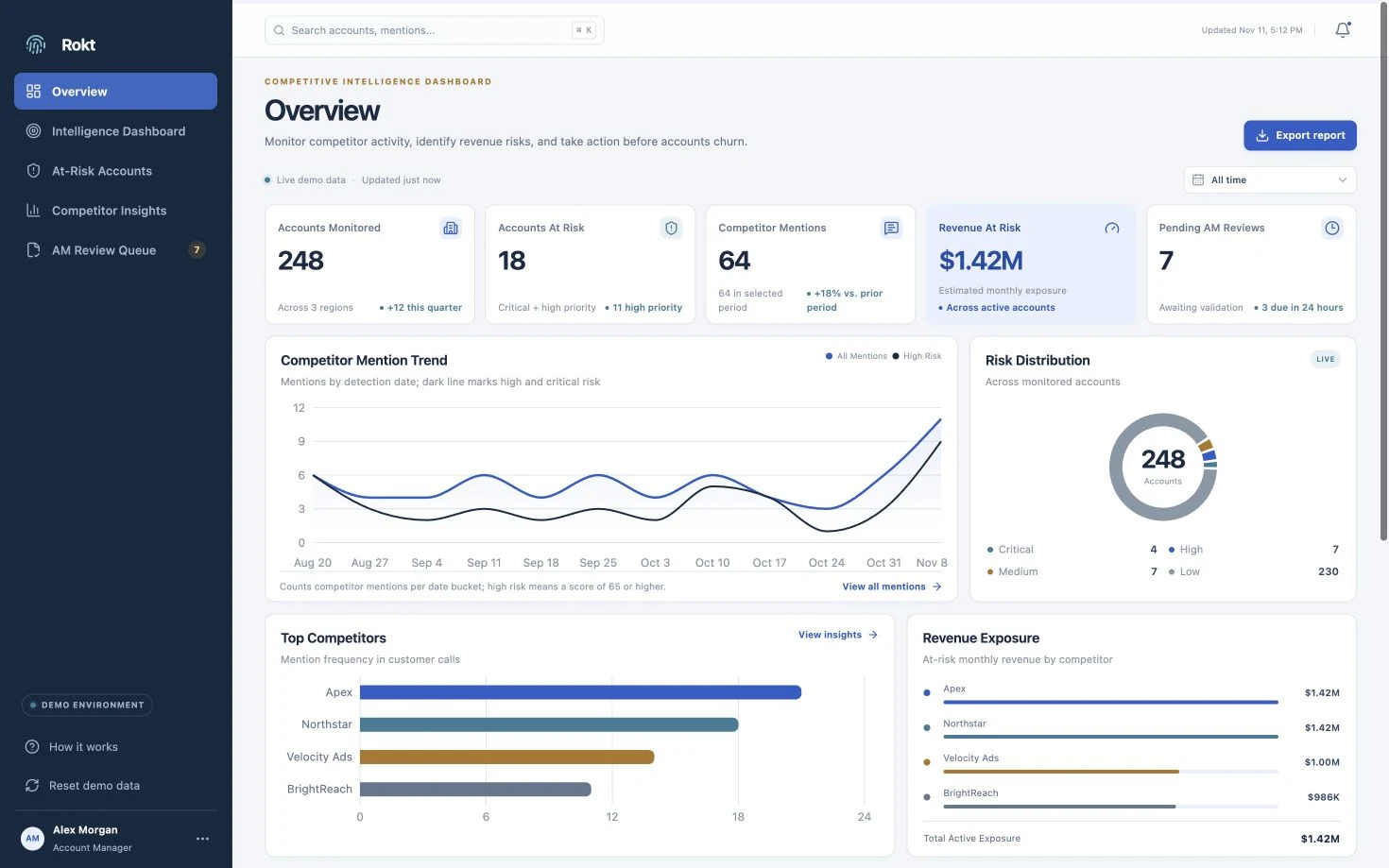
Overview
Competitor and churn signals from client calls were scattered across Google Chat and personal spreadsheets, leaving gaps in the information available for retention planning.
I designed a connected workflow: AI flags mentions, n8n prepares a HubSpot questionnaire, and account managers have three days to review it before submission. Real-time dashboard syncing gives stakeholders a shared view while distinguishing reviewed records from automatic submissions.
The Problem
A signal could be recorded—and still disappear.
Gong recorded client calls, but competitor and churn mentions reached retention decision-makers only when an account manager passed them on. Updates arrived through Google Chat and personal spreadsheets, leaving stakeholders without a shared view of what had been heard or needed attention. Important signals could slip through the cracks or reach the right people too late to act.
- 01 · RecordedClient conversation in Gong
The signal exists inside a call.
- 02 · Relayed manuallyGoogle Chat or a personal spreadsheet
Someone must notice, interpret, and report it.
- 03 · ReassembledRetention stakeholders piece it together
Scattered records can leave signals unseen.
How might we capture important churn signals and make them accessible to the right stakeholders in time for informed retention decisions?
Research Insights
Manual reporting was the bottleneck.
I interviewed 6+ team leads to understand where the competitive-intelligence process broke down. Account managers had limited time for manual reporting, and flagging potential churn was not consistently prioritized. Team leads received scattered updates across disconnected channels, sometimes too late to plan a response.
Across UX/UI, research, automation, and CRM integration, I focused on reducing that reporting burden: capture signals early, sync them automatically to a shared dashboard, and give account managers an easy way to review the information and add context.
| What was happening | What the design needed to do |
|---|---|
| Manual reporting competed with account managers’ other priorities. | Prepare the record automatically, so managers can review and enrich it instead of starting from scratch. |
| Signals arrived across Google Chat and personal spreadsheets. | Sync signals in real time to one dashboard accessible to all relevant stakeholders. |
| In the manual process, a form cannot submit without account-manager input. | Give managers three days to validate and add context. Then automatically submit unactioned records, keeping review status visible so stakeholders can distinguish them from reviewed information. |
Workflow Design
Automate the handoff. Keep human review explicit.
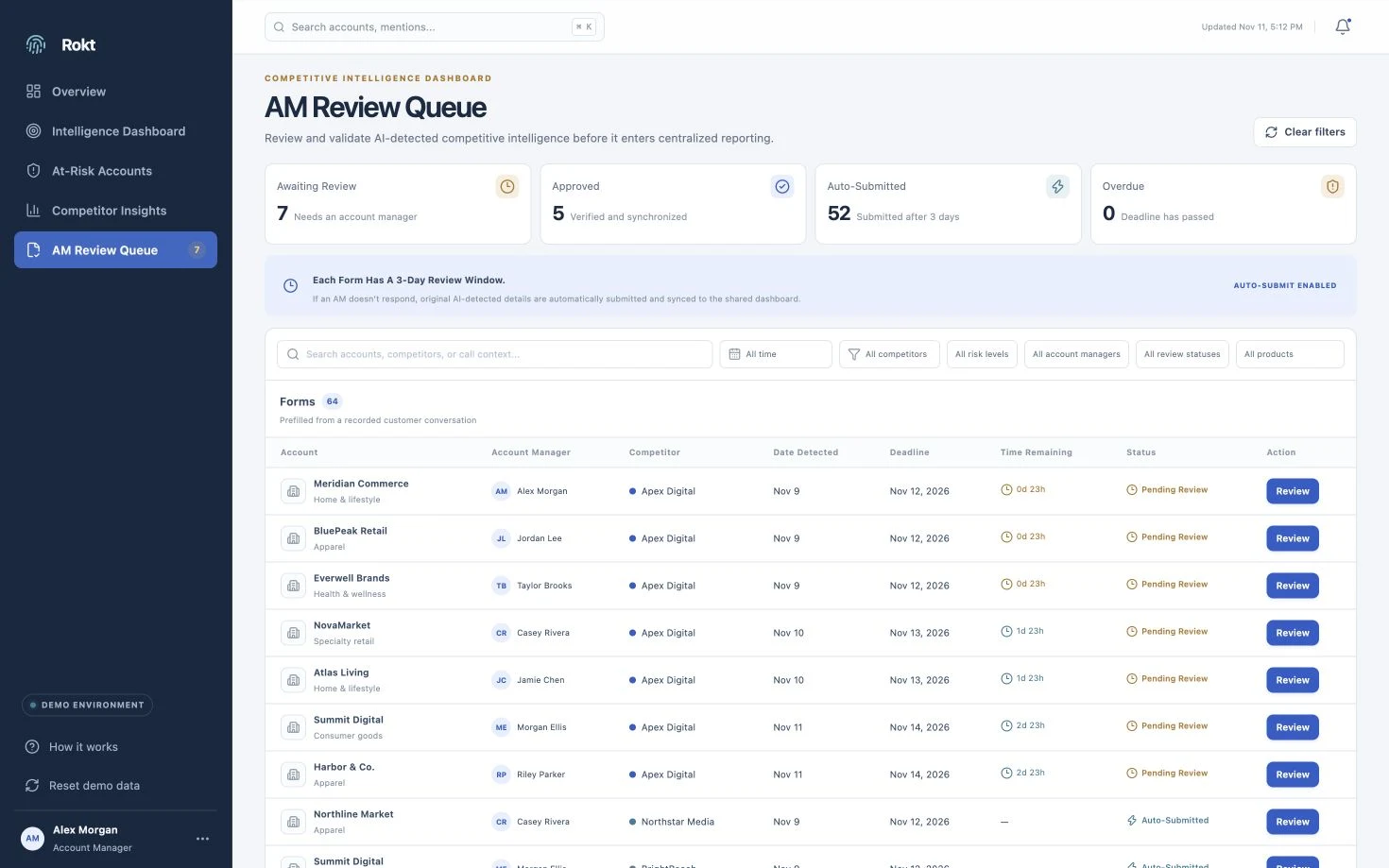
The workflow links detection to a prepared questionnaire, gives the relevant account manager three days to review, and syncs the collected information in real time. Automatic submission keeps information moving, helping decision makers form a retention plan in time.
- 01AI trackers
Flag competitor and churn mentions in Gong.
- 02n8n → HubSpot
Send a prefilled questionnaire to the relevant manager.
Human context accompanies the detected signal.
Managers can update the information after submission.
A shared starting point for retention planning.
UX Design
Two paths to a shared view of churn risk.
I designed the final flow around two audiences: account managers who supply relationship context, and decision makers who need a timely view of client risk. Prefilled records keep manual input focused on validation and additional context, helping signals reach the people planning a retention response with less effort from account managers.
The queue makes reviews easy to find; the dashboard connects account-level detail with portfolio and competitor patterns. Managers can revisit submitted information to add context as the client relationship evolves.
Account Manager’s Flow
Open Flow Video (Account Manager’s Flow, opens in a new tab)- Find the review
Open the AM Review Queue and identify the forms that need attention.
- Review and submit
Check the prefilled data, add relationship context, and approve the record.
- Track account health
Return to Intelligence and filter to the manager’s accounts.
Decision Makers’ Flow
Open Flow Video (Decision Makers’ Flow, opens in a new tab)- Start with the overview
Spot portfolio trends and accounts that need attention.
- Customize the view
Open At-Risk Accounts and filter by competitor and risk level.
- Explore competitor insights
Compare competitors, common threats, and patterns across accounts.
Testing & Iteration
Testing made context the next priority.
I gathered feedback on the dashboard and data quality from 7 account managers and 3 team leads through live usability testing sessions. Participants found the dashboard intuitive and informative, but their feedback highlighted two needs: clearer evidence behind each signal and a better distinction between a competitor mention and active switching intent.
Show why a signal was flagged.
Reviewers needed more source context to judge relevance and check the AI summary against the original conversation.
Separate a mention from switching intent.
Neutral and historical mentions needed to be distinguished from signals of active churn risk.
Refining what counts as a churn signal.
I refined the Gong AI tracker prompts through multiple working sessions, defining the last 180 days as the window for active churn risk. Account managers contributed edge cases from client calls to help capture nuanced competitor mentions and scope the prompts to weed out false positives.
A direct route back to the source.
I added a button in the review form linking to the Gong call recording that triggered it. Reviewers can access the original call excerpts when they want to check the AI summary’s reliability.
- Review form
- Source Gong recording
- Original call context
- Starting scopeCompetitor mentions
- Time windowLast 180 days
- ContextClient nuance + AM edge cases
- RelevanceFilter false positives
Final Solution
One workspace for signals, review, and retention planning.
The platform brings AI-detected competitor and churn signals into one shared workspace, with account-manager review, real-time updates, and visible review status. Account managers validate prefilled records and add relationship context. Decision makers use the overview, searchable intelligence, and filters to prioritize at-risk accounts, compare competitor patterns, and investigate the evidence behind each signal before forming a retention plan.
- AM Review QueueValidate the signals
- At-Risk AccountsPrioritize a response
- Competitor InsightsUnderstand the patterns
Try the demo here
The Impact
Less reporting effort. Faster retention planning.
Automating competitor-mention reporting reduced the manual effort required from account managers. Signals synced in real time to one centralized dashboard, reaching decision makers sooner and giving them the information they needed to form retention plans and respond to churn risk faster.
The project reported an 83% increase in the existing churn-risk response rate.
Reflections
Two lessons I’ll take forward.
The best UX improvements aren't always new interfaces.
This project challenged me to think beyond screens and interactions. The core problem wasn't a poorly designed interface, but a fragmented process across multiple tools. I learned that meaningful UX improvements sometimes come from redesigning the underlying workflow rather than introducing another standalone product.
Automation should reduce effort, not eliminate human judgment.
Automating competitive intelligence taught me the importance of balancing efficiency with trust. While AI helped identify and capture signals at scale, preserving human validation ensured that insights remained reliable and actionable. I learned to design systems that use automation without losing the contextual understanding people bring to decision-making.